
Snowball: AI Relationship Manager
Company
Role
Year
Overview
Snowball helps working professionals stay close to the people who matter. It remembers the context, surfaces who to reach out to and when, and helps you figure out what to say. I joined as the only designer and took it from a blank Figma file to a live App Store app in three months, including the brand, the app icon, and the store screenshots.
The Pivot
The original product helped students build a network they could lean on after graduation, so they could land a job in their field. Partway through, it became clear the idea was bigger than students. Everyone loses touch with people who matter. Names blur, follow-ups slip, good connections go quiet.
So we repositioned. Snowball became a relationship manager for anyone, with working professionals as the main target. The direction was founder-led, and I helped confirm it with research and with data from the earlier student app. The pivot set the tone for everything after it. This was not a contact list. It was an advisor.
Who it is for
Working professionals who meet a lot of people and want to keep those relationships warm without it turning into a second job. People growing a career, building a business, or just trying to be a better friend.
The core challenge: designing for AI I could not control
Most apps show fixed content in fixed places. Snowball does not. The AI decides what to say about each person and each moment, and that output changes every time. I could not design a screen for every answer.
So I stopped designing screens and started designing modules. I mapped every kind of information the AI might need to surface: a snapshot of who someone is, a set of at-a-glance facts, a suggestion to reconnect, an action item, a link between two people. I designed each one to stand on its own and to sit next to the others cleanly. The AI composes them. The result reads like a thoughtful brief, not a raw model dump.
This is the spine of the whole product. Every screen below is that system doing its job.

The design system
I built the design system in Figma. We were using shadcn, so I took it as the base and reshaped it to fit Snowball's brand: warmer, calmer, more personal than the default. Starting from a solid base let me move fast and stay consistent, which is what made shipping a full app in three months as one designer possible. Every module the AI composes is built from that system.
Key surfaces
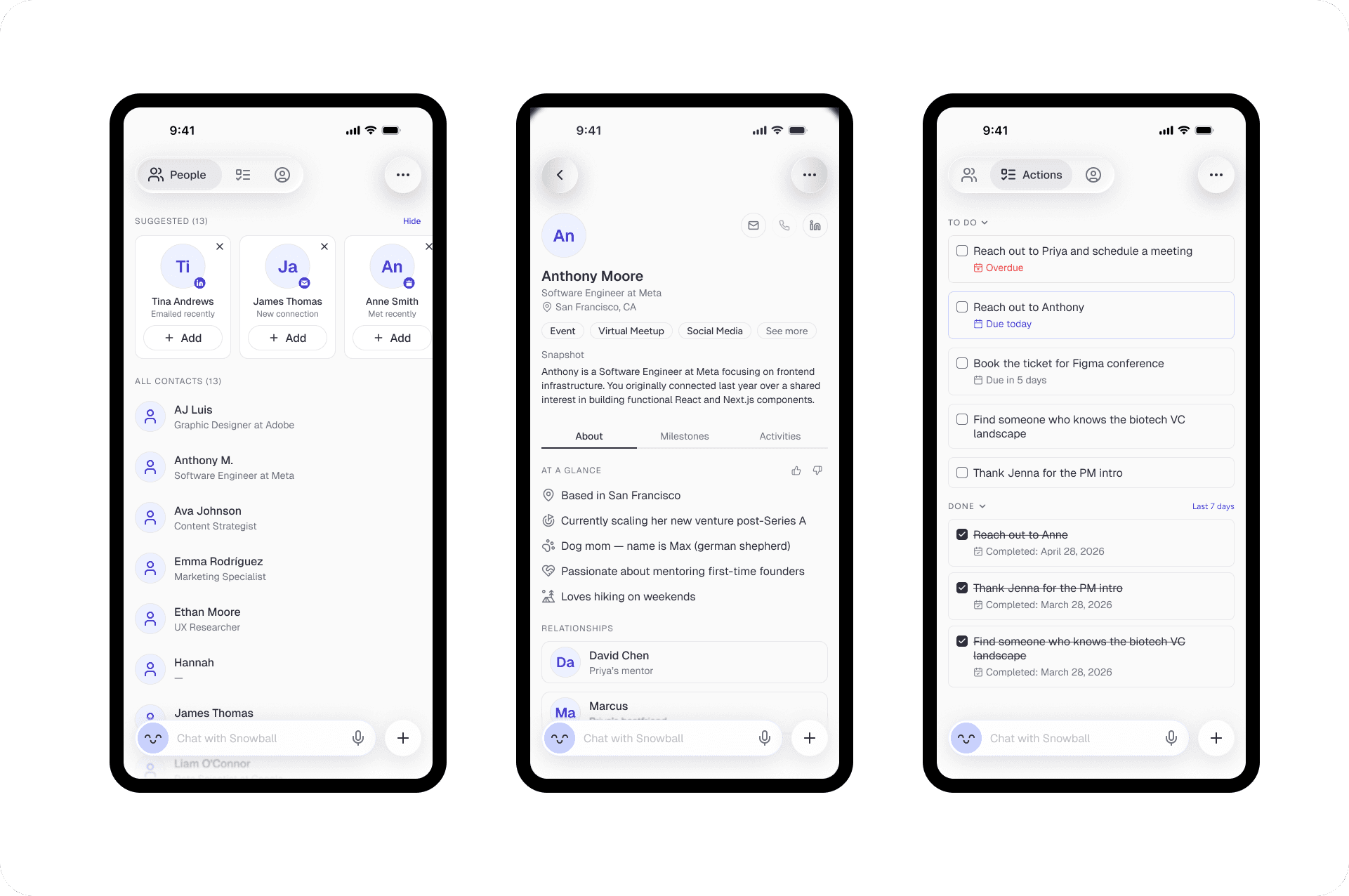
People. Not a flat address book. The top of the screen surfaces who to reach out to and why. "Emailed recently." "New connection." "Met recently." Each one is its own card. Below it sits the full list. The AI does the prioritizing, and the design makes its reasoning visible so you can trust the nudge.

Actions. Snowball turns conversations into to-dos. "Reach out to Anthony, due in 2 days." "Thank Jenna for the PM intro." A done history sits below so progress is visible. The user never has to build a task by hand. They talk, and the structure appears.

Profile. The richest example of the modular system. A snapshot paragraph, at-a-glance facts with their own icons, tabs for milestones and activities, and a relationships graph showing how people connect. Every block is a module the AI can fill. The thumbs up and down on the facts are a trust control, more on that below.

Assistant. The capture loop. You tell Snowball what happened in plain language. It confirms what it heard, pulls out action items into a structured card, and asks "anything to add or change?" before saving. Input is messy and human. Output is clean and reviewable.

Designing for trust
Snowball holds sensitive things: who you know, what you talked about, what is going on in their lives. Two decisions shaped how I handled that.
Private by design. Snowball is a single-player app. Everything you share is encrypted. It is not social media and it does not try to be. That let me design something calm and quiet instead of loud and gamified. The tone is an advisor you trust, not a feed fighting for your attention.
Trust in the AI. When an AI writes about your relationships, it has to earn it. So I built in ways to keep the user in control. The thumbs up and down on profile facts let you correct what it gets wrong. The assistant confirms before it saves and lets you edit. Its reasoning is visible, not hidden. The user always decides what Snowball believes.
Continuous discovery
I did not treat research as one phase up front. We had 38 beta testers. I interviewed 20 of them directly. The rest sent feedback and feature requests as they used the app, and I answered them and pushed for more detail every time. That loop ran the whole three months and fed straight back into the design.

Outcome
Snowball shipped to the App Store and is live in private beta. I delivered the full product design, the brand identity, the app icon, and the App Store screenshots. Blank file to launched app, as the only designer, in three months.
What I learned
Designing for AI is a different job than designing screens. You are not laying out content, you are building a kit the model can assemble, and you are designing the moments where the human checks the machine's work. Get the modules right and the trust controls right, and the AI feels like a good advisor. Get them wrong and it feels like a stranger guessing about your friends.